Help
Common questions
Installing ahprice, keeping the app running, how prices work, and what is shared. Can't find your answer? Ask on Discord.
Commands you'll type
Type these in the game's chat box.
/reloadUsed in How do I install ahprice?, I installed from CurseForge. Do I still need the app?, The game says the ahprice app is not running. How do I fix it?, Do I have to leave the ahprice window open?, Does ahprice update itself?, Does ahprice slow down my game or make load screens longer?/ahprice optionsUsed in Can ahprice post my auctions for me?, Russian or other text shows as boxes in ahprice's tooltip lines. How do I fix it?, What does ahprice upload?/ahprice scanUsed in How do I scan the auction house, and how long does it take?/ahprice helperUsed in The game says the ahprice app is not running. How do I fix it?/ahprice cleanup confirmUsed in Does ahprice slow down my game or make load screens longer?/ahprice postUsed in Can ahprice post my auctions for me?
Getting started
What is ahprice?
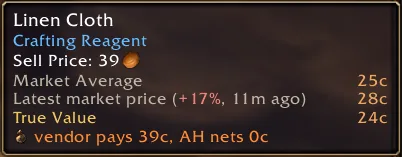
ahprice is a free auction house addon and PC app for World of Warcraft Forever. The addon records prices when you scan the auction house and shows True Value, the market average and the latest listing on item tooltips.
The app on your PC shares your scans with everyone else who uses ahprice, so your tooltips have prices even for items you have not scanned yourself.
Is ahprice free?
Yes. The addon and the app are free to download and use.
Does ahprice work on retail WoW or other versions?
No. ahprice is only tested and usable on World of Warcraft Forever, the game folder named _forever_.
How do I install ahprice?
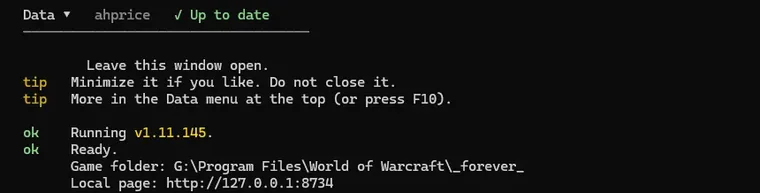
Download the installer for your system from the Download page: AHPriceSetup.exe for Windows, a zip for macOS, or a tarball for Linux. Setup asks for your game folder, puts the addon in Interface\AddOns\AHPrice and the app beside the game, then opens the ahprice window.
Leave that window open while you play, and type /reload in game after you scan.
I installed from CurseForge. Do I still need the app?
Yes. CurseForge installs the addon only, and the game cannot go online by itself, so without the app your tooltips only see your own scans.
Run the installer from the Download page on the same game folder. You do not need to uninstall the addon first. CurseForge can keep updating the addon, and the app refreshes the addon files when it updates too. After either update, type /reload.
How do I scan the auction house, and how long does it take?
Open the auction house and click Scan, or type /ahprice scan. A full scan takes less than 10 seconds.
The game only allows a full scan about every 15 minutes. In between, searching and browsing the auction house still record the prices you see.
The ahprice app
Setup can't find my WoW folder. What do I do?
Setup looks in the Blizzard and Battle.net install records and in the usual folders on every drive, including Program Files (x86)\World of Warcraft, Program Files\World of Warcraft, World of Warcraft and Games\World of Warcraft.
If yours is somewhere else, click Browse and choose the _forever_ folder inside your World of Warcraft folder, not the World of Warcraft folder itself.
The game says the ahprice app is not running. How do I fix it?
The addon cannot reach the internet, so it needs the ahprice app open on your PC. Start it from the ahprice shortcut (on a Mac, run ./ahprice in the addon folder), then type /reload. Type /ahprice helper in game to check it again.
If the app is already open, it is set up for a different WoW folder. Close it, run setup from the Download page, choose your _forever_ folder, then /reload. If you only installed from CurseForge, install the app the same way.
Do I have to leave the ahprice window open?
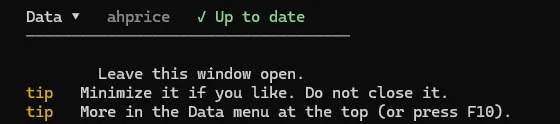
Yes, while you play. When it starts it downloads the shared price history for every realm you have a character on, then pulls new scans every minute and sends yours. Closing it stops sharing until you open it again.
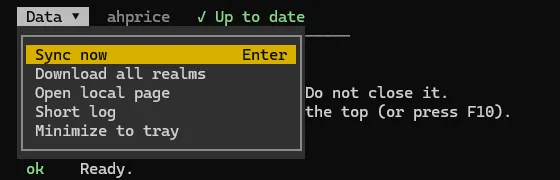
On Windows, minimizing sends it to the system tray. The game reads new prices when the UI reloads: a popup offers a Reload button every 30 minutes (never in combat or at the auction house), or type /reload any time.
Does ahprice update itself?
Yes. While the app is open it checks for a new release at startup and every 10 minutes, downloads it, checks its SHA-256, and installs the new addon and app files. Your saved prices stay.
On Windows the window restarts minimized in the background. On Mac and Linux it asks you to close the app and open it again. Then type /reload in game to load the new addon. A failed update is tried again an hour later, up to three times.
Windows SmartScreen or my antivirus warns about AHPriceSetup.exe. Is it safe?
SmartScreen often warns on new, unsigned downloads, and a few antivirus engines flag new installers by guesswork (for example Wacatac.B!ml). That is expected for a small addon, not proof the file is harmful.
Only download ahprice from the Download page, and compare the file's SHA-256 with the one shown there. When it matches, choose More info, then Run anyway.
Does ahprice slow down my game or make load screens longer?
The addon keeps price history in memory so tooltips show instantly. If load screens feel long, type /ahprice cleanup confirm. It clears the history the addon saved; average prices stay, and with the app running the history comes back after /reload.
Prices and scanning
What is True Value?
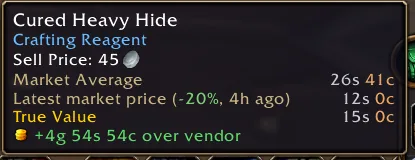
True Value is what an item sells for right now. Each hour of scans gets one vote, the middle cheapest price seen that hour, and True Value is the middle of those votes. A vote from yesterday counts half as much as one from now.
One odd listing cannot move it. The percent on tooltips, Insights, Flips and disenchant values all use it. More about True Value.
How is the market average calculated?
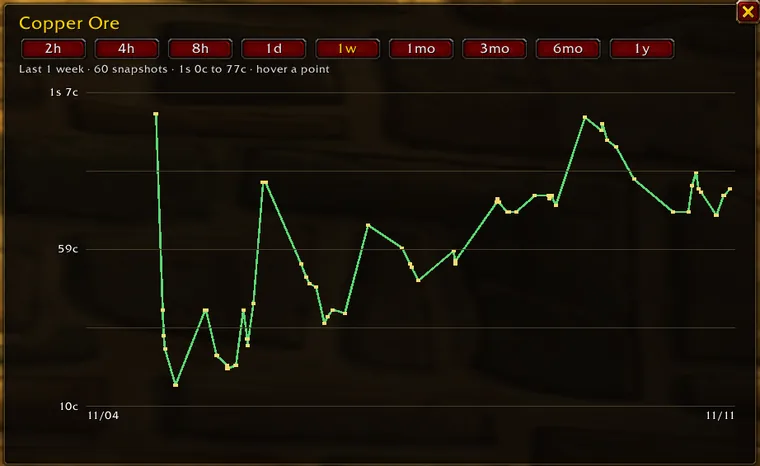
It uses every saved cheapest price for the item. Newer prices count more: a price from 7 days ago counts half as much as one from today. Each price is weighted by how many were listed at that low, up to 200, so one huge stack cannot set it alone.
Why is the tooltip price different from the auction house?
The latest price is the single cheapest listing from the last scan. True Value is what it sold for over recent hours, and the market average is the long view over days. When the market moves, they differ, and the percent shows the latest listing against True Value.
Prices are kept per realm and faction. If nobody on yours has scanned lately, the prices are older: scan to bring them up to date.
Why should I scan if ahprice already shares prices?
Every scan updates prices for everyone on your realm and faction. Realms where few players scan have older, thinner prices, and your scans fix that.
The app says my realm waits for approval. What does that mean?
Your realm is new to ahprice. New realms are approved by hand, usually within a day. Your scans still work in your tooltips and are kept for when it is approved. Shared prices from other players start on their own after that, so leave the app open.
Can ahprice post my auctions for me?
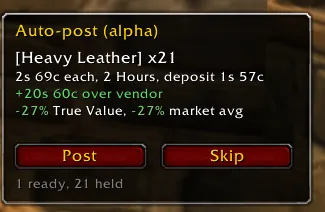
Partly. Auto-post is an early (alpha) feature, off by default. Turn it on under Alpha in /ahprice options. A panel beside the auction house Sell tab lists your items to sell, best gain first, and you click once for each post.
Type /ahprice post to see what it would post and what it holds back, and why.
Game languages
Does ahprice work with a non-English game client?
Yes. ahprice works with non-English WoW Forever clients, including German, French, Spanish, Portuguese, Italian, Russian, Korean and Chinese. Prices are shared by item, so everyone sees the same prices whatever language they play in.
Russian or other text shows as boxes in ahprice's tooltip lines. How do I fix it?
Update to the latest version, which keeps Cyrillic and other non-Latin text readable. If it still happens, open /ahprice options, go to Tooltips and set Font for ahprice lines to Game default.
Mac and Linux
Does ahprice work on a Mac?
Yes. Download the macOS zip from the Download page, open it and double-click Install.command. It looks for World of Warcraft in Applications, or you can type the path to your _forever_ folder.
The Mac app needs Python 3.9 or newer. If yours is missing or too old, it tells you to install the latest from python.org or with Homebrew.
Does ahprice work on Linux?
Yes. Download the Linux tarball from the Download page and run ./install.sh. It looks for World of Warcraft in Wine, Lutris and Steam Proton folders, or you can type the path to your _forever_ folder. It needs Python 3.9 or newer.
Privacy and trust
What does ahprice upload?
Auction prices from your scans (item, cheapest price, quantity, realm, faction and time), disenchant results, and vendor prices. Sales from Auction successful mail are shared only if you turn that on in /ahprice options.
It never sends character names, seller names, account details or passwords. The app sends a random install id, its version and your game language so prices can be filed correctly.
Does ahprice.com track me?
The site counts visits with a random browser id and the site that sent you. It does not keep your IP address or personal data.
Is ahprice allowed? Could it get my account in trouble?
ahprice works the way other auction house addons do. The addon only reads what the game shows you and saves it in its own saved files, and the app on your PC shares those files. It does not play for you: every scan and every post starts with your click.
ahprice is free, as Blizzard's add-on policy requires, and is not made by or affiliated with Blizzard. We cannot speak for Blizzard's decisions.
API and AI tools
Is there an API for WoW Forever auction prices?
Yes. ahprice has a read-only JSON API and an MCP server for AI tools, and neither needs a key. The Developers page has the endpoints, setup steps and rate limits.
Can I ask an AI assistant about WoW Forever prices?
Yes. Connect your AI tool to the ahprice MCP server at ahprice.com/mcp. The Developers page has copy-paste setup for Claude Code, Cursor, VS Code, Codex, Gemini CLI, Windsurf and Zed.
Help and updates
How do I report a bug or ask for a feature?
Join the ahprice Discord and post there. Say what you did, what you expected and what happened, and include a screenshot of the ahprice window or the chat message when you can.
Where can I see what changed in each update?
The News page lists every release and what changed.