1
Run setup
Choose the game folder, such as _classic_beta_. The folder itself, not Interface or AddOns inside it.
install
Latest data received .
WoW Forever
Latest release v1.1.23
ahprice records auction prices in WoW Forever and shares scans with the group. Download for your system, leave the window open while you play, then type /reload in game.
Windows
AHPriceSetup.exe · Run the setup, choose the game folder, then leave the window open.
macOS
AHPrice-macOS.zip · Open the zip, double-click Install.command, choose the game folder.
Linux
AHPrice-linux.tar.gz · Extract, run ./install.sh, choose the game folder (Wine/Lutris OK).
That's normal for a new, unsigned addon. Check the SHA-256 below, then:
Prefer to check first? See the VirusTotal report.
After an update, delete old installers in Downloads or use a private window. Chrome may cache an older file under the same name.
1
Choose the game folder, such as _classic_beta_. The folder itself, not Interface or AddOns inside it.
2
Windows setup adds a desktop shortcut; on macOS and Linux start ./ahprice (or Install.command). The ahprice window has to stay open so scans can sync.
3
In the game, type /reload. The addon writes the scan, the window sends it, and tooltips pick up the shared list.
The window
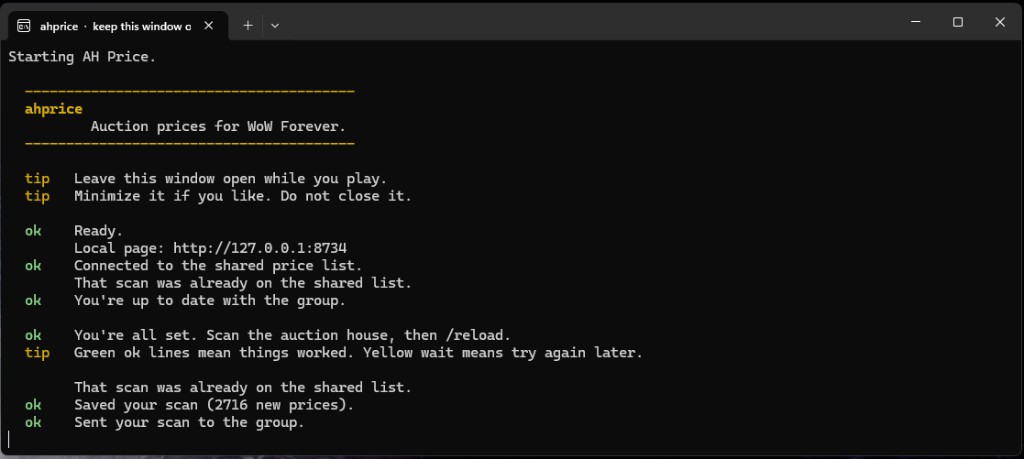
Green ok lines mean a scan saved or reached the shared list. Minimize the window if you like. Closing it stops sync until you open it again.
Trust
It copies the addon into Interface/AddOns/AHPrice and starts the local price window. It does not modify other programs or run without prompting. Data leaves this PC only when that window is open and you /reload after a scan.
This site
There is no public source download here. Install from this page for your system. After that, the window can update the addon while you play. ahprice is only tested and usable on WoW Forever.
Windows security
On Windows, SmartScreen often warns on new, unsigned downloads. That is expected for a small addon, not proof the file is malicious. Verify the SHA-256 below before you run anything.
setup_sha256 (or platforms.windows.sha256) in latest.json.SHA-256 for the v1.1.23 packages on ahprice.com.
Windows PowerShell: Get-FileHash .\AHPriceSetup.exe -Algorithm SHA256. macOS / Linux: shasum -a 256 AHPrice-macOS.zip or sha256sum AHPrice-linux.tar.gz. Hashes must match latest.json.
A few VirusTotal engines often flag new unsigned Windows installers (for example Wacatac.B!ml). That is usually a false positive when the hash matches this page.
If Defender quarantines the Windows setup, submit it to Microsoft as a software developer and include the SHA-256 above.